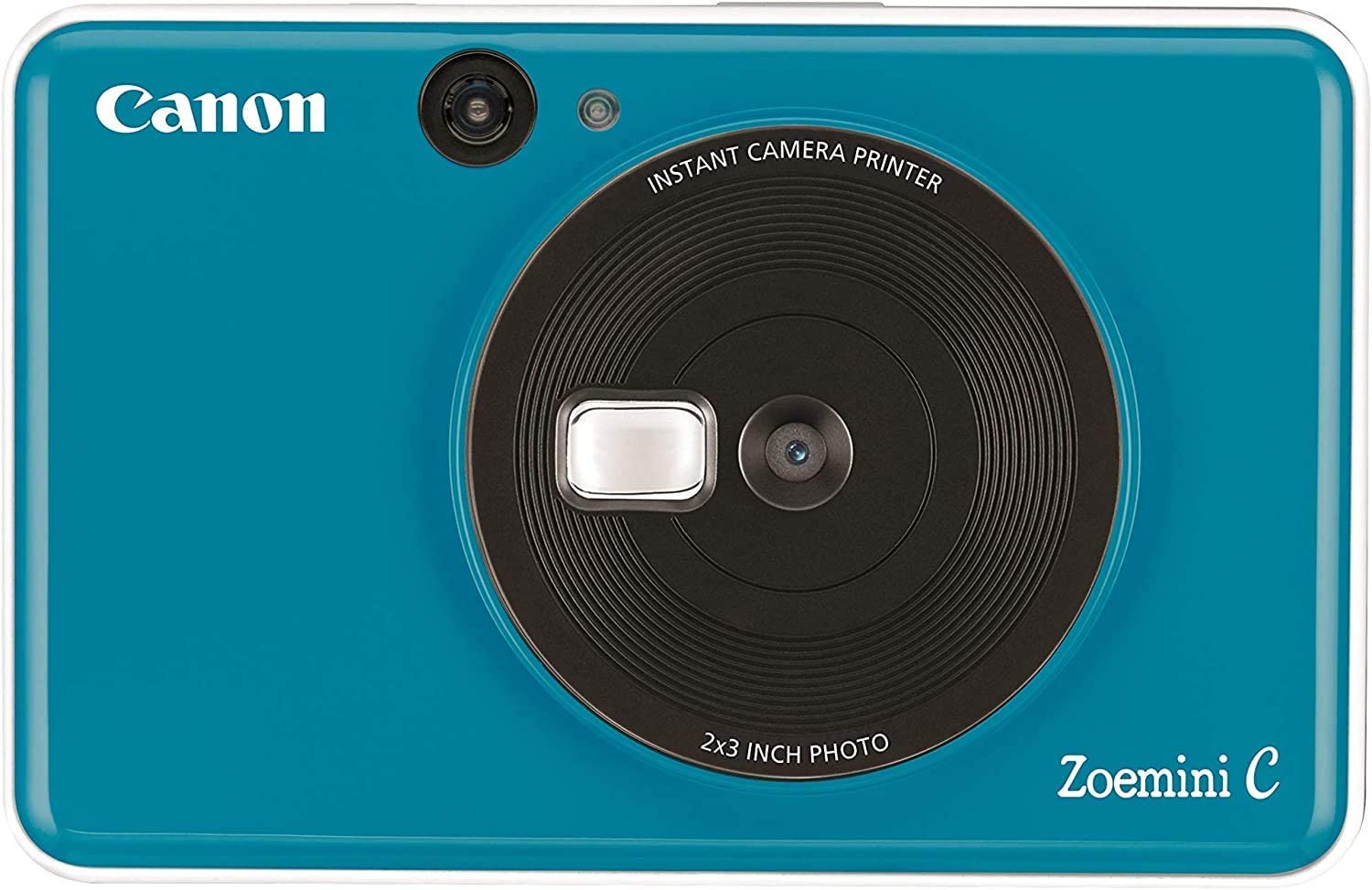




Canon Zoe Mini C Camera Photo Printer - Seaside Blue
- كود المنتج : 89547
ابرز المواصفات
Printer
- Print Technology
ZINKTM
- Print speed
Approximately 50 second (Motor Start & Stop, at room temperature 25°C )
- Print Resolution
314 x 500 dpi
- Borderless Printing
YES
- Automatic Paper Sensor
Yes
- Battery
Built-in Rechargeable lithium polymer Battery, 700mAh
- Battery life
Average 25 photo prints
- Auto-power Off
YES (5 mins)
- Reset Button
Yes
- Charging Speed
Approximately 90 minutes (From 0% to fully charged)
- Control Panel
1. Power Button
2. Shutter Button
3. Reprint Button
4. Aspect Ratio Button ( 2 x 2 / 2 x 3 ) - Memory Card Compatible
YES, MicroSD Card, up to 256GB
- Supported Media Type
ZINKTM photo paper
- Maximum Paper Size
2.0" x 3.0"
- Paper Capacity
Up to 10 sheets of Canon ZINKTM photo paper + 1 SMART SHEETTM
- Body Color
Bubble Gum Pink / Bumble Bee Yellow / Mint Green / Seaside Blue
- Body Size (L x W x H)
121 x 78.3 x 23.7 mm
- Weight
170 g
- Recommend Operating, Charging & Storage Temperture (℃)
15 - 32°C (59 - 90°F)
- Recommend Operating Humidity (RH)
40-55% RH
- Operating Temperture (℃)
5 - 40°C (41 - 104°F)
- Operating Humidity (RH)
<70%RH
Camera
- Single Still Photo Resolution
5MP
- Single Still Photo Format
JPG
- Photo Aspect Ratio
1) 3:2 (2" x 3")
2) 1:1 (2" x 2") - Flash Light
Yes
- Fill Light
No
- Focusing Range
Fixed (Range: 50cm~∞ )
- Zoom
Fixed
- Sensitivity
Auto (ISO Range: 100 - 1600)
- White balance
Auto
- Exposure Adjustment
Auto
Indicators
- Bottom LED (Charging)
Red: Charging
Green: Charging complete - Top LED (Status)
White On: Device is On and Standby
White Flashing: Processing Smartsheet / Preparing Printing
White On -> White Flashing: Device is Booting
Red On: Device is too High Temperture
Red Flashing: Cover Opened / Printer Error / No Paper / Paper Jam
Red/White Looping: Low Battery, Very Low Battery
Blue Flashing: Smartsheet Error
Cyan On: Device is too Low Temperture
Cyan Flashing: Printer Head Cooling
Magenta On: Mass Storage Mode
Magenta Flashing: SD Card Error
Yellow/Magenta/Cyan/White Looping: Printer is Printing
Green Flashing: Firmware Updating - Aspect Ratio LED (Green) x 2
1) 3:2 (2" x 3")
2) 1:1 (2" x 2") - Speaker (Status)
1) Power On
2) Power Off
3) Camera Shutter
4) Camera Error (fail to take photo)
5) Reprint Failed
6) Inert or Eject SD Card
7) SD Card Error
ZINK Photo Paper Information
- ZINKTM Photo Paper
ZINK photo paper pouch (10 sheets)
2” x 3” photo paper / Peel-and-sticky back - Storage Environment
Temperature: 0 - 25°C, Humidity: 40-55% RH
Printer
- Print Technology
ZINKTM
- Print speed
Approximately 50 second (Motor Start & Stop, at room temperature 25°C )
- Print Resolution
314 x 500 dpi
- Borderless Printing
YES
- Automatic Paper Sensor
Yes
- Battery
Built-in Rechargeable lithium polymer Battery, 700mAh
- Battery life
Average 25 photo prints
- Auto-power Off
YES (5 mins)
- Reset Button
Yes
- Charging Speed
Approximately 90 minutes (From 0% to fully charged)
- Control Panel
1. Power Button
2. Shutter Button
3. Reprint Button
4. Aspect Ratio Button ( 2 x 2 / 2 x 3 ) - Memory Card Compatible
YES, MicroSD Card, up to 256GB
- Supported Media Type
ZINKTM photo paper
- Maximum Paper Size
2.0" x 3.0"
- Paper Capacity
Up to 10 sheets of Canon ZINKTM photo paper + 1 SMART SHEETTM
- Body Color
Bubble Gum Pink / Bumble Bee Yellow / Mint Green / Seaside Blue
- Body Size (L x W x H)
121 x 78.3 x 23.7 mm
- Weight
170 g
- Recommend Operating, Charging & Storage Temperture (℃)
15 - 32°C (59 - 90°F)
- Recommend Operating Humidity (RH)
40-55% RH
- Operating Temperture (℃)
5 - 40°C (41 - 104°F)
- Operating Humidity (RH)
<70%RH
Camera
- Single Still Photo Resolution
5MP
- Single Still Photo Format
JPG
- Photo Aspect Ratio
1) 3:2 (2" x 3")
2) 1:1 (2" x 2") - Flash Light
Yes
- Fill Light
No
- Focusing Range
Fixed (Range: 50cm~∞ )
- Zoom
Fixed
- Sensitivity
Auto (ISO Range: 100 - 1600)
- White balance
Auto
- Exposure Adjustment
Auto
Indicators
- Bottom LED (Charging)
Red: Charging
Green: Charging complete - Top LED (Status)
White On: Device is On and Standby
White Flashing: Processing Smartsheet / Preparing Printing
White On -> White Flashing: Device is Booting
Red On: Device is too High Temperture
Red Flashing: Cover Opened / Printer Error / No Paper / Paper Jam
Red/White Looping: Low Battery, Very Low Battery
Blue Flashing: Smartsheet Error
Cyan On: Device is too Low Temperture
Cyan Flashing: Printer Head Cooling
Magenta On: Mass Storage Mode
Magenta Flashing: SD Card Error
Yellow/Magenta/Cyan/White Looping: Printer is Printing
Green Flashing: Firmware Updating - Aspect Ratio LED (Green) x 2
1) 3:2 (2" x 3")
2) 1:1 (2" x 2") - Speaker (Status)
1) Power On
2) Power Off
3) Camera Shutter
4) Camera Error (fail to take photo)
5) Reprint Failed
6) Inert or Eject SD Card
7) SD Card Error
ZINK Photo Paper Information
- ZINKTM Photo Paper
ZINK photo paper pouch (10 sheets)
2” x 3” photo paper / Peel-and-sticky back - Storage Environment
Temperature: 0 - 25°C, Humidity: 40-55% RH
منتجات مماثلة